

Know Where Every Dirham Goes. Before You Spend It.

AI-native construction ERP that connects site, procurement, HR and finance. Every material request checked against budget, every labour hour costed to the right activity.

AED 5B+ in client project pipeline. 10+ years in construction. 20+ years in ERP.

They track spend. We prevent overruns.

Legacy ERPs
Track after spend
Spend vs budgetBudget
20% over budget
Request
Order
Delivery
Invoice
Month-end report
Overrun found in the report. The money is already spent.
Mismar ERP
Control before spend
Spend vs budgetBudget
Held at budget
Request
Order
Delivery
Invoice
Month-end report
Flagged at the request and routed for approval. Nothing ordered yet.

Materials, labour, equipment. One budget.

Materials

Every request checked against the budget and stock before it is ordered.

Labour

Every hour on site costed to the right activity, then into payroll.
Equipment

Requests and moves between sites, tracked per project.

Price it, budget it, see the margin.

01
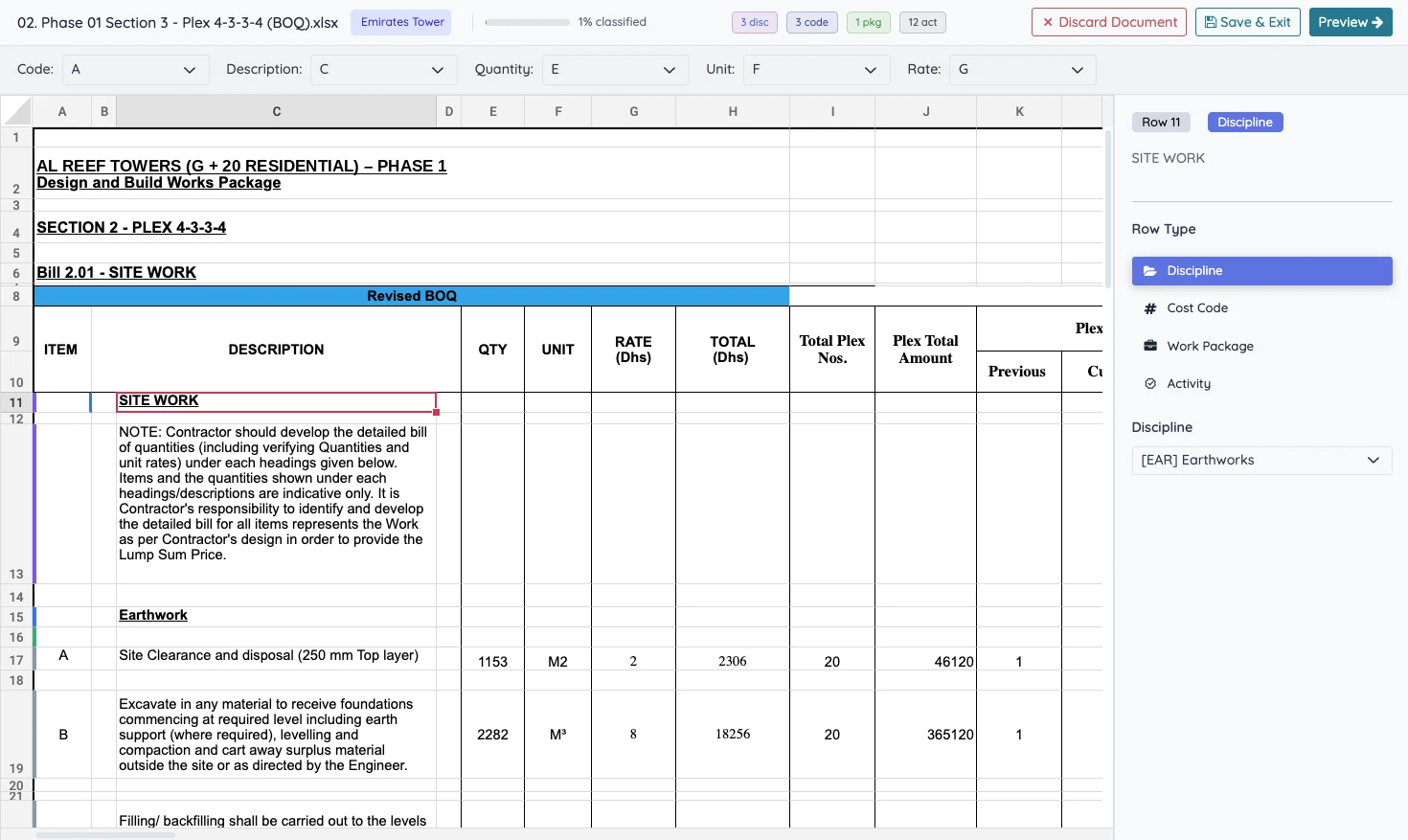
Import the BOQ as is
Each line is classified into discipline, cost code, work package and activity.
02
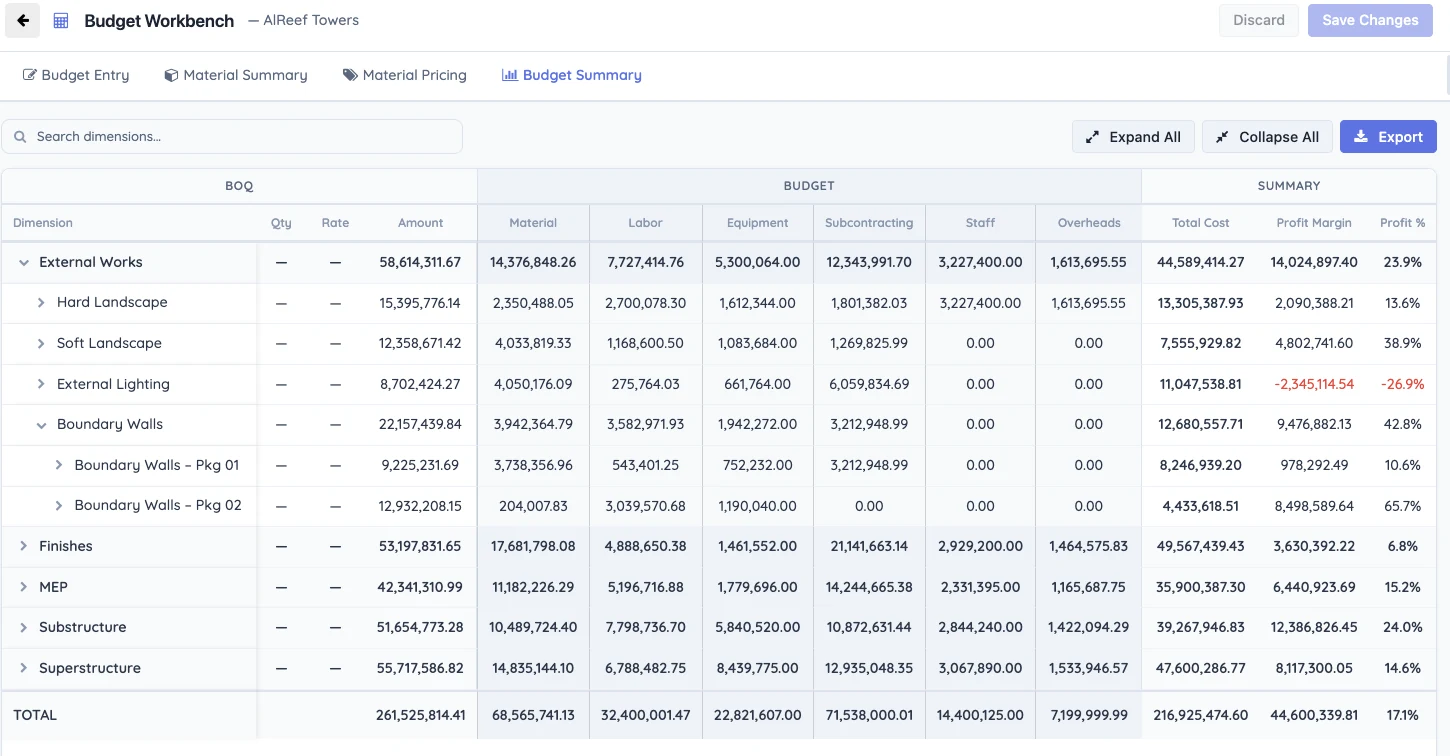
Build the budget against it
Cost per BOQ line by type, with the margin worked out as you go.
BOQ spreadsheet opened in the Mismar BOQ classifier, with each row tagged by discipline, cost code, work package and activity
2
Mismar budget workbench summary showing BOQ amount, budget by cost type, total cost and profit margin per work section
1

Every request checked before money moves.

Overruns and unbudgeted lines are flagged and routed for approval.
01
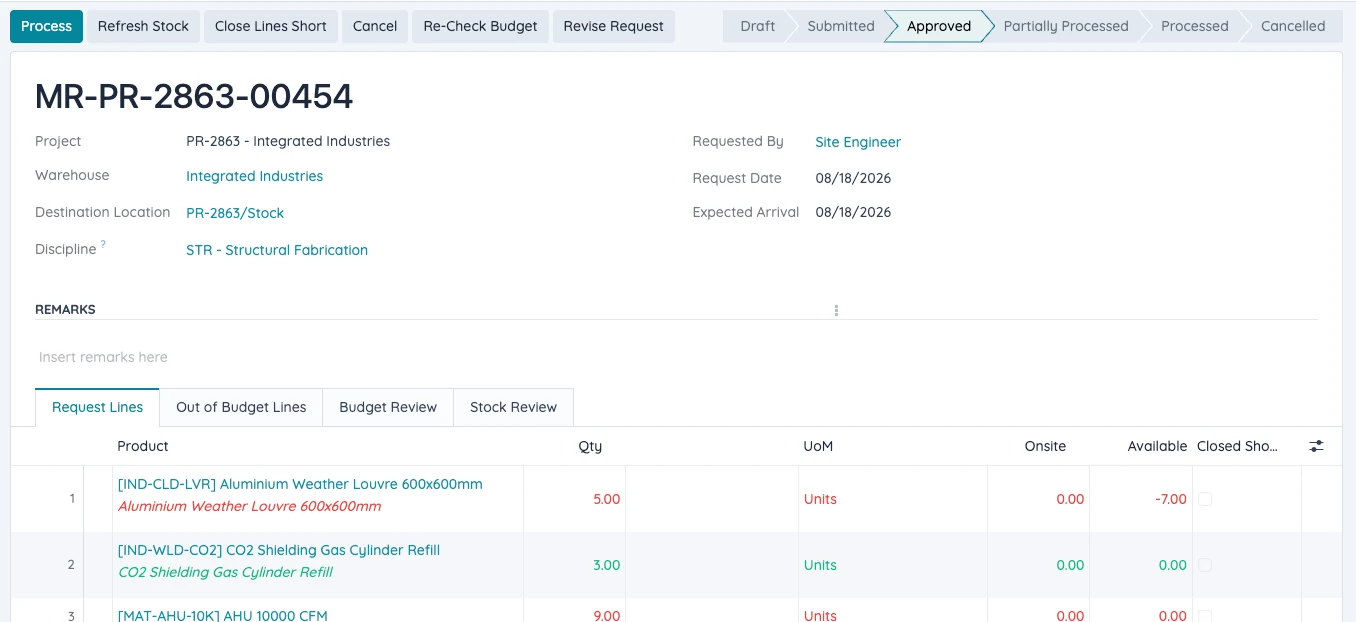
Site raises the request
From the Site Ops app, against a project and a discipline.
Material Request · Request Lines
Mismar Material Request showing the requested lines for a project
02
Checked against the budget
Budget, previously requested and this request, side by side. Unbudgeted lines are flagged and routed for approval.
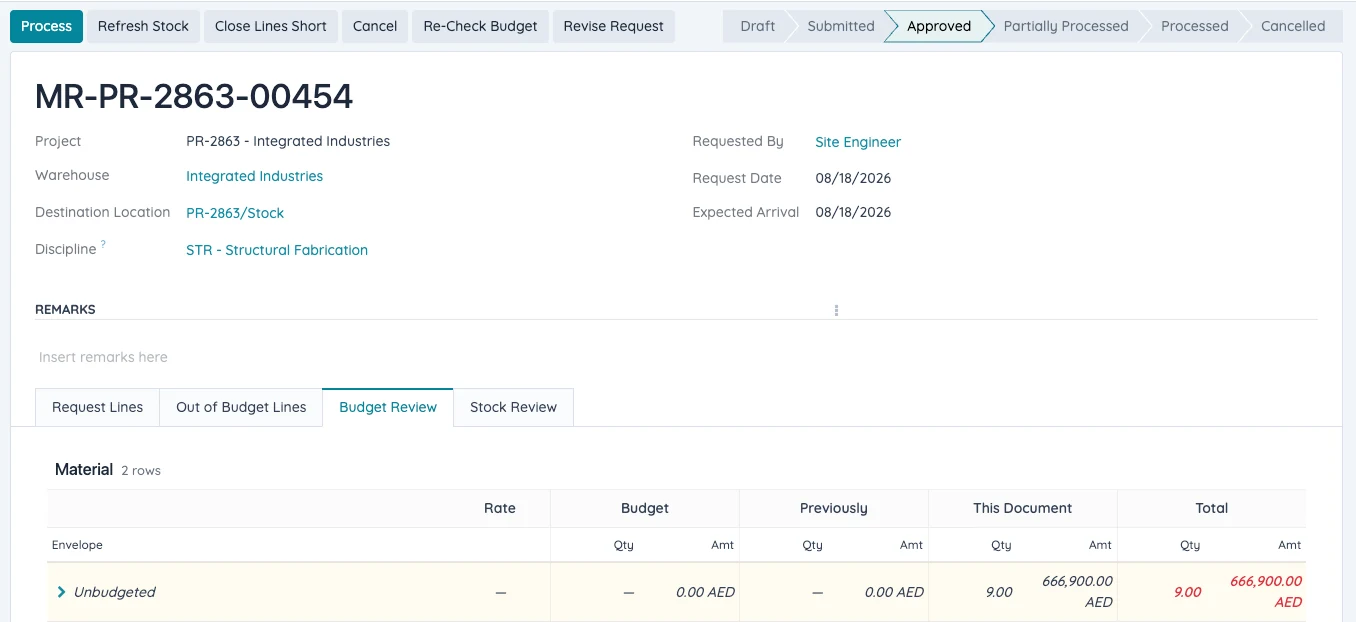
Material Request · Budget Review
Budget Review tab comparing budget, previously requested and this request, with an unbudgeted line flagged
03
Transfer before you buy
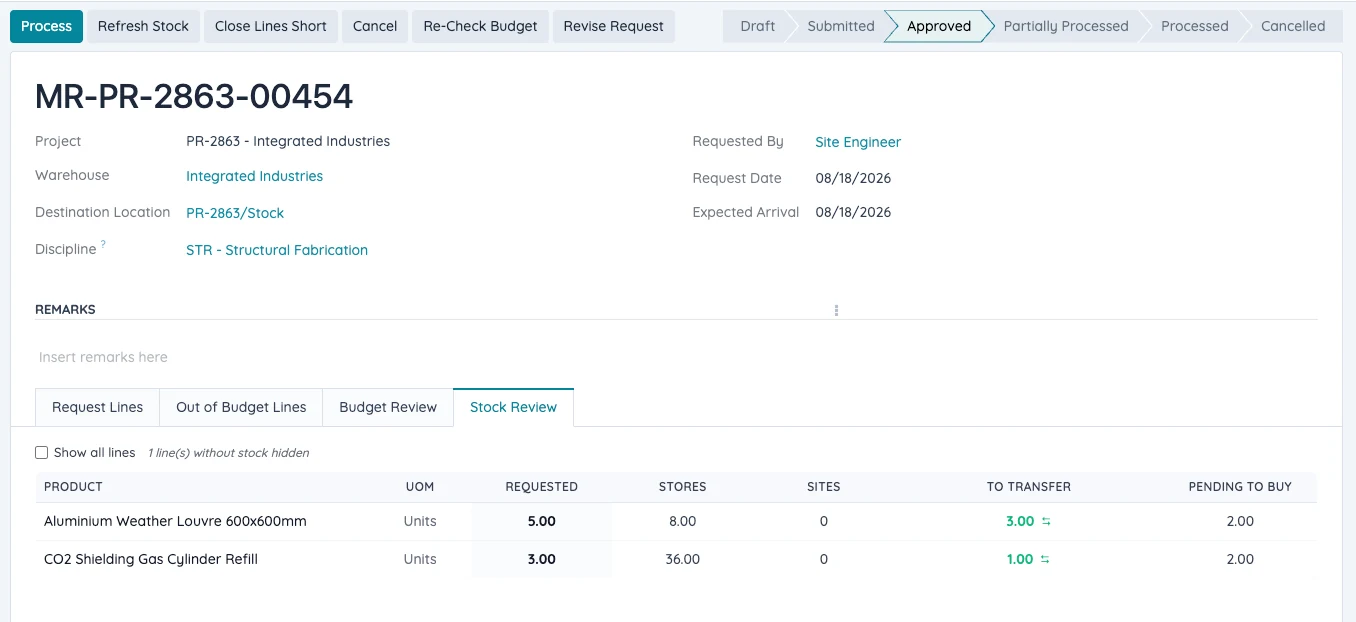
Stock available at another site is shown first, so procurement only buys what is missing.
Material Request · Stock Review
Stock Review tab showing quantity in stores and on other sites, with the quantity to transfer
Material Request · Request LinesMaterial Request · Budget ReviewMaterial Request · Stock Review
Mismar Material Request showing the requested lines for a project
Budget Review tab comparing budget, previously requested and this request, with an unbudgeted line flagged
Stock Review tab showing quantity in stores and on other sites, with the quantity to transfer

See margin slipping months before the final account.

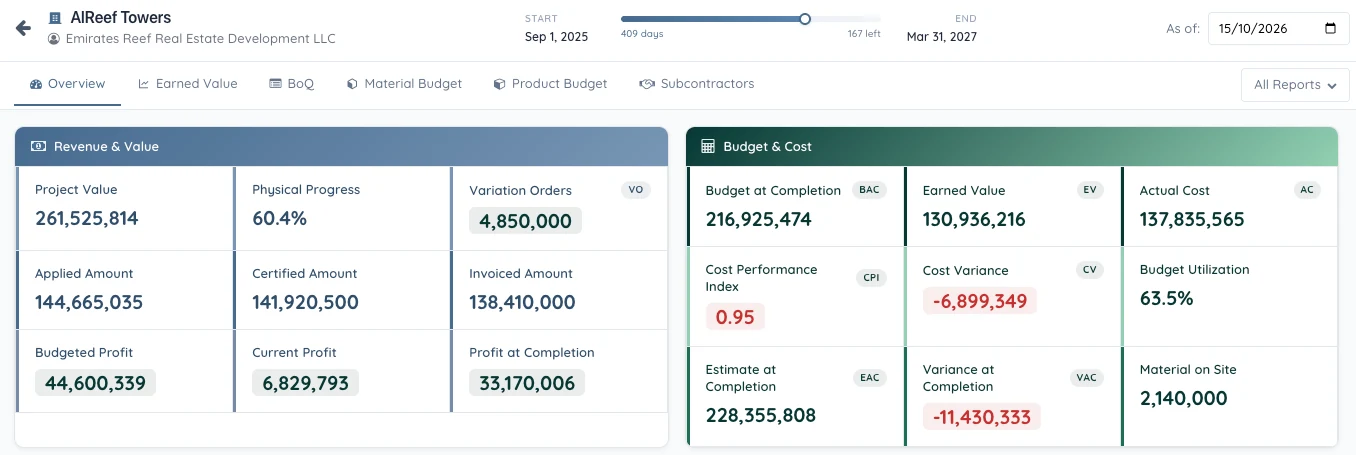
Project overview
Cost Control overview for a tower project with budgeted, current and at-completion profit, cost performance index and variance at completion
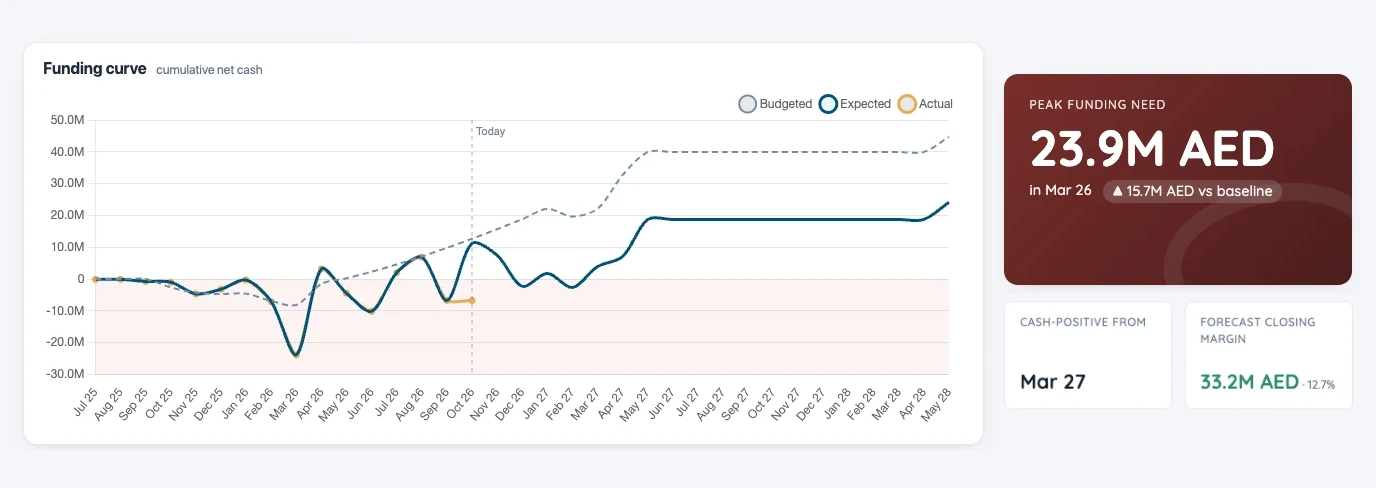
Cash flow
Project cash flow funding curve with peak funding need, cash-positive date and forecast closing margin
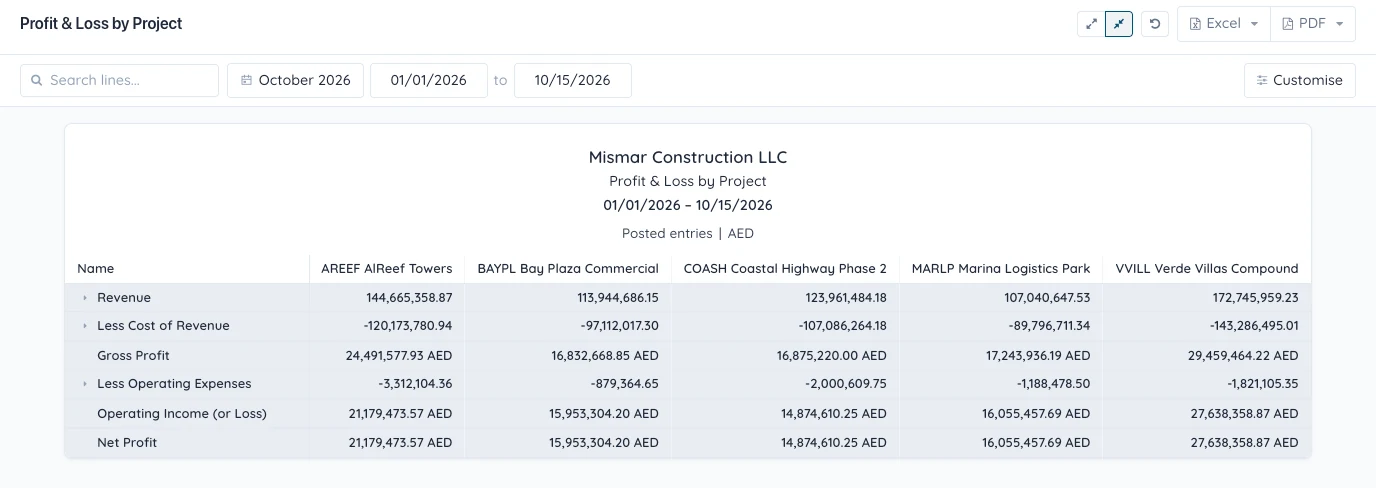
P&L by project
Profit and loss by project, with revenue, cost of revenue, gross profit and net profit for each project side by side
Portfolio summary
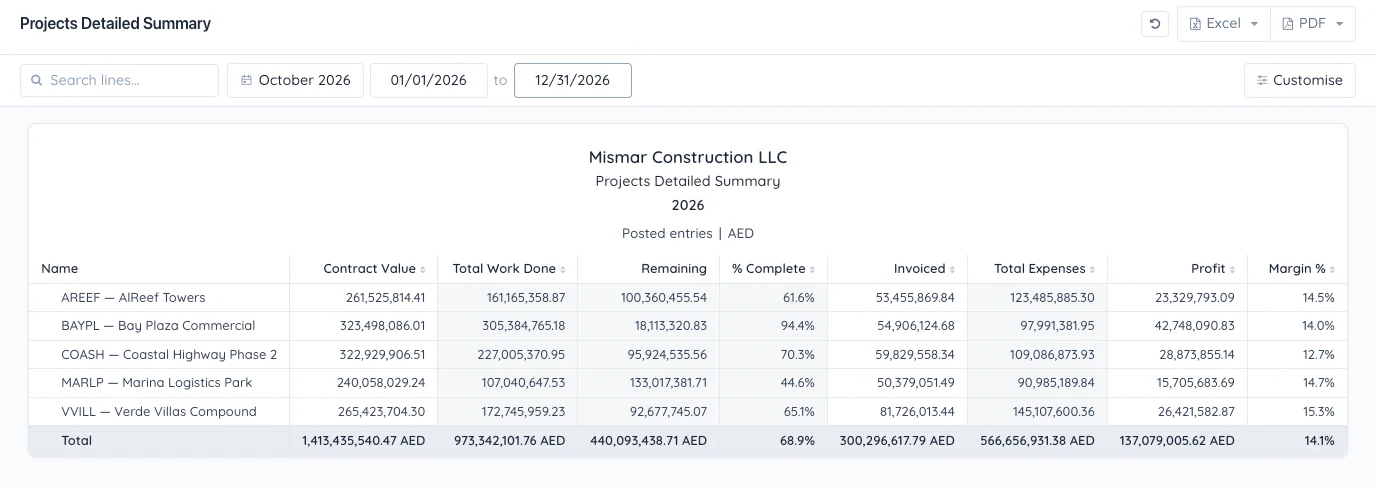
Projects detailed summary with contract value, work done, invoiced, expenses, profit and margin for every project
Mobile attendance

Pay for the hours that happened, on the project they happened.

Supervisors record attendance on site from their phone. Every hour is costed against the BOQ activity in real time, then flows straight into payroll.

Face recognition and geofencing
every punch verified on site
Allocated to activities
on the right budget line
Leave, bonus, deductions
requested from the app
AI built in

AI that knows your whole operation

Mismar is the system of record across site, procurement, HR and finance. So its AI works from your real numbers, across the full project life cycle.

Claudeconnector
ChatGPTconnector
Client BOQ
Budget
structure
SUB · Excavation1,200 m³
SUP · Concrete works850 m³
SUP · Reinforcement96 t
Mapped to activities
Less data entry
•Upload the client's BOQ as is. AI maps it to your activities and budget.
•Create hundreds of vendors from trade licences, with expiry reminders.
•Vendor quotes from email and PDF read into the system.
How is Tower B doing this month?
Budget utilization62%
Physical progress58%
CPI 0.94 · Profit at completion 9.8% vs 12% budgeted
Answers, not only reports
Ask how any project is doing, any time, and get the report you need. Every department works in one system, so the answer is already there.
Rebar quotes
Budget AED 2,900/t
Vendor A · 2,950/tOver budget
Lead time 21 days
Vendor B · 2,880/tBest fit
Lead time 10 days
Vendor C · 2,790/tToo slow
Lead time 35 days
Decisions before spend
AI compares vendor quotes on price and lead time against the budget, so you choose before money is committed, not after.

E-invoicing without the double work.

Mismar ERP is integrated with an FTA-accredited provider. Send invoices in one click, and receive supplier invoices straight into Mismar.


Above AED 50MAppoint ASP 30 Oct 2026Go live 1 Jan 2027
Under AED 50MAppoint ASP 31 Mar 2027Go live 1 Jul 2027
Book a Demo
Legacy ERPs
done manually · 2 systems
Send
Your ERP
Export
Upload to ASP portal
Receive
ASP portal
Download
Re-enter in your ERP
Mismar ERP
1 click · 1 system
Invoice
Send
Receive
Accredited provider
To your
client
Reported
to FTA
From your
suppliers

Built to serve every sector of construction

Main Contractors
MEP
Facade
Geotechnical
Roads
Fit-out

Built for how construction actually works

Project manager at his desk with construction cranes behind him and paperwork flying away

Stop cost overruns before they start.

See how Mismar checks every request against the budget, on projects like yours.

Mismar.ai is committed to advancing the construction industry by improving the lives of people working in construction, driving technology innovation, and building a global community of groundbreakers.
Discover the power to connect everyone and everything on one platform.
Office 1011, Dtec
A5 Building, Dubai Digital Park
Dubai Silicon Oasis
Dubai, UAE
2026 | Mismar AI - FZCO | All Rights Reserved